AI WhatsApp Bot vs. Meta's Built-In Agent: Which Is Better?
When is an AI WhatsApp bot the better choice, and when is Meta's built-in agent enough? A practical guide covering automation, n8n, Make and integrations.
Short answer: Meta's built-in agent suits businesses that need fast replies, a quick setup, and simple scenarios. But an AI WhatsApp bot connected to real business automation is the right fit when you need to work against a CRM, a calendar, inventory, forms, internal systems, and multi-step processes. If the goal isn't just "answer the customer" but also advancing a sale, classifying inquiries, running checks, opening tasks, and connecting systems — in most cases a custom solution with n8n, Make, and LLM APIs is the right choice.
Why is there even a dilemma?
Over the past year, many businesses discovered they can add an AI layer to WhatsApp almost without a heavy development project. On one hand, Meta is pushing built-in AI agent capabilities that make it easy for businesses to get started. On the other hand, the business automation market has moved forward: today you can build a WhatsApp AI agent that doesn't just chat — it actually does work.
The common mistake is assuming both solutions solve the same problem. In practice, they solve different problems:
- Meta's built-in agent: a convenient, fast conversational layer.
- An AI WhatsApp bot connected to automation: an operational, sales, and service layer connected to the business itself.
When is Meta's built-in agent enough?
If you're a small business or a team looking for an initial solution, there are cases where you don't need to build a complex system.
Scenarios where it works well
- Answering FAQs: business hours, address, shipping policy.
- Basic routing: sales / service / support.
- Collecting initial details before handing off to a rep.
- Fast, natural-language replies without managing deep integrations.
Main advantages
- Short setup time — you can get started relatively fast.
- Low technical complexity — fewer layers, less maintenance.
- Easy onboarding — good for a feasibility test.
- Fewer architecture decisions — good for teams without tech resources.
Where it hits a wall
The moment you need an actual action, not just a reply, limitations show up:
- No flexible access to all of the business's core systems.
- Hard to manage complex logic based on customer type, order status, SLA, or permissions.
- More limited customization for the company's unique processes.
- Harder to produce documentation, control, logs, and operational tracing.
In other words: it's good as a conversation layer, less good as a business process engine.
When do you need a real AI WhatsApp bot?
If a customer sends a message and you expect something to happen behind the scenes — that's where the value of a custom solution begins.
Clear signs you need a custom solution
- You have a CRM, ERP, ordering system, or calendar you need to connect.
- You want the bot to check a customer's status before replying.
- You need to automatically open tickets, tasks, or quotes.
- You work with several data sources: a catalog, documents, a price list, a knowledge base.
- You have different processes by department, language, region, customer type, or product.
- You need control over cost, prompts, permissions, and answer quality.
In other words: when WhatsApp is a work channel, not just a communication channel.
The real difference: replying vs. executing
This is the most important point in the comparison.
Meta's built-in agent helps manage a conversation. By contrast, an AI-powered WhatsApp bot + business automation can execute an entire chain of actions:
- Identify who the customer is by phone number.
- Pull data from the CRM.
- Check for an open balance or an active order.
- Decide whether to reply automatically or hand off to a rep.
- Generate an answer based on internal documents.
- Update the system, open a ticket, and send a summary.
This isn't just a "chatbot." It's an operational AI agent. The difference is covered in AI agent vs. chatbot: the real difference.
Concrete examples from the field
1. A private clinic: smart appointment scheduling
A customer writes on WhatsApp: "Can I book for next week?"
A basic solution will reply with opening hours or ask to leave details. An advanced solution does much more:
- n8n pulls the patient's history from the CRM.
- The agent checks the treatment type, calendar availability, preferred branch, and relevant doctor.
- If it's a new patient, it sends an intake form.
- If documents are missing, it requests them.
- After confirmation, it books the appointment and sends an automatic reminder.
Here, the business value doesn't come from how well the message is phrased — it comes from the ability to connect conversation to action. A full example of this process is in WhatsApp bots and AI agents connected to a CRM.
2. E-commerce: order status and upsell
A customer asks: "Where's my order?"
An advanced WhatsApp bot can:
- Identify the customer by phone number or order number.
- Pull shipping data from the order system.
- Draft a reply tailored to the real status.
- Open a service ticket if there's a delay.
- If the order hasn't shipped yet, offer a shipping upgrade or a complementary product.
A system like this can be built with Make or n8n, connecting to the CRM, the shipping company, and a language model that drafts the message.
3. B2B: lead qualification and routing to the right salesperson
A lead comes in on WhatsApp and writes: "We need a solution for several branches."
Instead of a "we'll get back to you" message, an AI agent can:
- Ask 3–4 qualifying questions.
- Classify company size, industry, and budget.
- Create a record in the CRM.
- Calculate a lead score.
- Open a task for the right salesperson.
- Summarize the conversation clearly inside the customer's record.
This is no longer just a service tool — it's business automation that drives revenue.
Where do n8n and Make fit in?
Many business owners ask if they need to "build everything from scratch." In most cases, no.
n8n is a good fit when you need deeper control
n8n is especially strong when you need:
- Custom, complex logic.
- Working against multiple APIs.
- Custom conditions, branches, and triggers.
- Self-hosting or greater control over data.
- Combining AI, databases, and internal tools.
For example: a workflow that receives a WhatsApp message, sends it to an LLM, looks up information in Notion or PostgreSQL, updates HubSpot, and returns a reply — all with organized logs.
Make is a good fit for fast connections and visual operation
Make is excellent when you want to:
- Quickly connect popular SaaS systems.
- Build automations that are clear to non-technical teams.
- Launch an MVP fast before deeper architecture.
In practice, many businesses start with Make to test a scenario, then move to n8n when they need more control, better performance, or more complex logic. For a deeper comparison, see Make.com vs. n8n, and for cases where n8n beats a ready-made tool: when n8n beats an off-the-shelf tool.
Practical comparison: what should you choose?
| Factor | Meta's built-in agent | Custom AI WhatsApp bot |
|---|---|---|
| Setup time | Fast | Medium |
| Fit to the business | Relatively limited | Very high |
| Integrations | Basic / more limited | Broad and flexible |
| Multi-step processes | Limited | Very strong |
| Use of internal data | Partial | Full, permission-based |
| Control and logging | Basic | Advanced |
| Initial cost | Lower | Higher |
| Long-term ROI | Good for simple use | High when there's a real business process |
What should you plan before building?
The biggest mistake is starting from the question "which AI model should we choose?" The right question is: which business action do we want the bot to perform?
1. Define one clear use case
Not "a bot for everything" — something measurable:
- Reducing customer service load by 30%
- Cutting lead response time
- Automating appointment scheduling
- Order status with no rep involved
2. Map your data sources
- CRM
- Order system
- Process documents
- Price lists
- Calendars
- Forms and internal systems
Without this kind of mapping, the AI will sound smart but act on partial information.
3. Decide when the bot hands off to a human
Every good AI agent also needs to know when not to answer. For example:
- An angry customer
- A sensitive legal or financial question
- High uncertainty
- A request that exceeds the system's permissions
4. Measure quality, not just volume
Track:
- First-contact resolution rate
- Average handling time
- Rate of handoff to a rep
- Answer quality
- Time saved for the team
- Impact on sales or retention
How to choose correctly: a simple decision framework
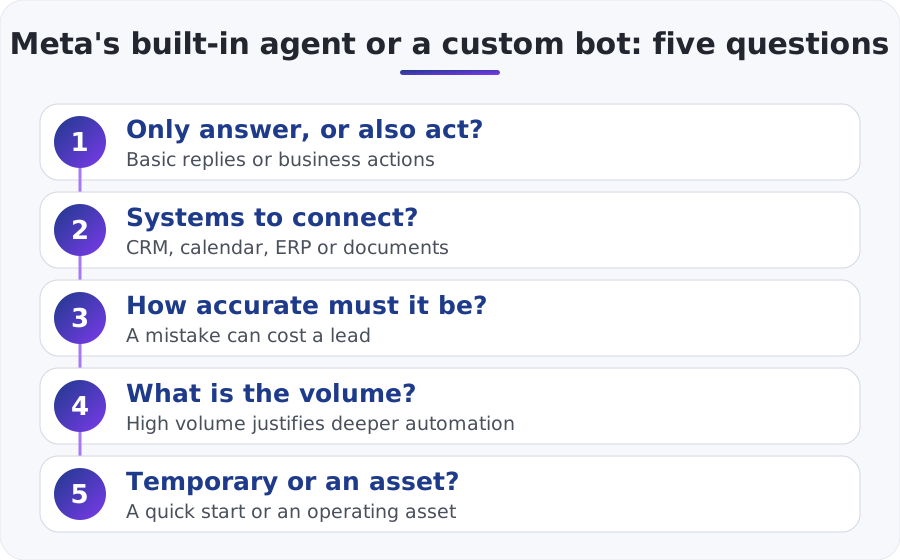
Ask yourself 5 questions:
1. Do you only need to answer, or also to act?
If you only need basic answers – Meta may be enough. If you need to perform business actions – go in the direction of a custom bot.
2. Do you have systems that must be connected?
If you have a CRM, calendar, ERP, documents, or forms – you'll likely need a custom solution.
3. What level of accuracy is required?
If a small mistake in the conversation could cost you a lead, an appointment, or a customer – higher control is preferable.
4. What is your inquiry volume?
The higher the volume, the greater the value of deep automation.
5. Do you want a temporary solution or an operational asset?
A built-in agent is sometimes a good starting point. A custom bot is usually a long-term asset.
So what's actually better?
There's no one-size-fits-all answer.
- If you need a fast presence and basic conversation, Meta's built-in agent can be enough.
- If you need an AI agent that works inside the business, with connections, permissions, processes, and control — go with a custom WhatsApp bot.
For most businesses that already have inquiry volume, several active systems, or an organized sales/service team, the real value comes from the custom solution — not because it's "more advanced," but because it's connected to operational reality.
Bottom line: the right next step
Before choosing a platform, define the one business scenario that hurts the most today on WhatsApp: service, sales, scheduling, leads, or order status. Then check which systems need to be part of it, and where you need AI that thinks — not just replies.
If, after mapping it out, it turns out the need is mostly basic answers, a simple start can be enough. But if you need real business automation, an AI WhatsApp bot connected via n8n or Make to your systems will almost always be the right long-term choice.
The most practical next step is to build a short proof of concept on one use case, measure results over two to three weeks, and only then scale. That way you make the decision based on data — not hype.
Short FAQ
Does every business need a custom WhatsApp bot?
No. If the need is only for basic responses, a built-in solution may be enough.
Is a custom bot more expensive?
Usually yes at the beginning, but it may deliver a faster return if it replaces manual work and prevents lead loss. Detailed price ranges: how much a WhatsApp bot costs for a business. And for the cost of the messages themselves: WhatsApp service message pricing after Meta's 2026 changes.
Is n8n suitable for SMBs too, or only for enterprises?
Yes. In fact, for small and medium-sized businesses, n8n can be an excellent solution because it enables flexible automation without heavy development.
What matters most in a project like this?
Not the technology itself, but defining clear scenarios, using reliable information sources, and creating the right connection between WhatsApp and the business process.
Related Articles
What wears you out most in your business? Pick one and we'll start there
One click, and the form is already partly filled in.